Title here
Summary here
AprilTags
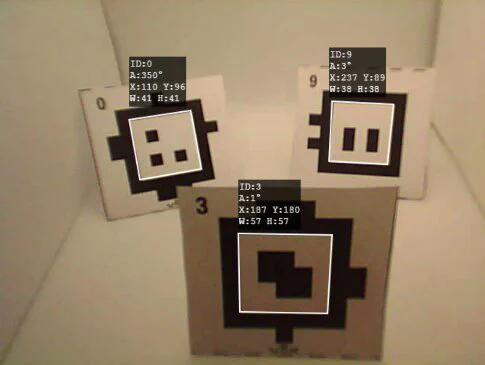
An AprilTag is a small square marker that looks a lot like a pixelated QR code. In modern VEX competition fields, you may see AprilTags stuck to the walls or goals. A robot with a camera can use these tags like landmarks on a map — they tell the robot exactly where it is on the field!
Why does this matter?
Odometry (tracking with wheel encoders) slowly drifts off over the course of a match. AprilTags act like GPS — they give the robot an instant, perfectly accurate position fix whenever the camera can see one.
What is an AprilTag?
AprilTags are similar to barcodes and QR codes — they are patterns designed to be quickly detected by a camera. Unlike a QR code that stores a web address or a lot of text, an AprilTag only stores one simple thing: its ID number. Because they are so simple, they are extremely fast to detect and decode.
Each tag on the competition field is placed at a known, fixed location. When the robot’s camera spots a tag, it can calculate exactly how far away it is and what angle it is looking at it from.
How Your Robot Sees the Tag
When the robot’s camera looks at the field, it follows a series of steps to go from a raw video image to useful position data:
Thresholding: The camera converts the full-color image into pure black and white pixels. This makes the high-contrast borders of the AprilTag stand out clearly against the background.
Quad Detection: The software searches the image for any groups of pixels that form a 4-sided shape (a quadrilateral). This quickly filters out all the background noise like field tiles and game pieces.
Decoding: The camera examines the unique pattern of small squares inside the border of any found quad and matches it to a database of known AprilTag IDs. If it finds a match, the robot locks onto that tag.
The Math: Figuring Out Position
Once the camera detects a tag, it uses geometry to calculate distance and angle:
Offset: If the tag is perfectly centered in the camera image, the robot is directly in front of it. If the tag appears shifted to the right side of the image, the robot knows it is sitting to the left of the tag.
Angle: If the robot is looking straight at the tag, it appears as a perfect square. If the robot is looking at it from an angle, the square appears as a trapezoid because of perspective. The robot measures how distorted the corners are to calculate its exact viewing angle.
Benefits of AprilTags vs. Color Vision
| Feature | Standard Color Vision Sensors | AprilTag Vision System |
|---|---|---|
| How it detects | Searches for a specific color blob (e.g., “bright red”). | Searches for a high-contrast geometric pixel pattern. |
| Lighting Sensitivity | 🔴 High. Dim room lights or sunshine can change how colors look, blinding the robot. | 🟢 Low. It only cares about contrast (black vs. white), so it works in almost any lighting. |
| Data Provided | Only gives the 2D direction of the object on the screen. | Gives full 3D coordinates (x,y,z) and angles. |
| False Positives | Might mistake a student’s red shirt for a red game piece. | Almost impossible to fake; the pattern must be mathematically precise. |
AprilTags give absolute position — meaning there is no drift. Every time the camera sees the tag, it calculates position from scratch using the tag’s known fixed location. See Localization to learn how teams combine AprilTags with odometry for the most accurate autonomous navigation.